
Shopping on a Budget
The cost of food is continually rising—or maybe it’s just the kids getting older and eating so much more! No matter the size of your household, we are all looking for ways to save money and the grocery store is one of the likely targets each week. So how do you balance the need for nutritious food plus a few treats and not blow the budget? The following tips may help:
- Check the fridge and freezer before making your meal plan and grocery list. Throwing away good food that has gone bad is the worst way to waste money. And that list is key—always take one to the grocery store and avoid shopping when you’re hungry.
- Check the store specials while you are making your list. You should only stock up on food you can definitely eat. Keep in mind that deals like buy 4, get 1 free often still applies if you only buy 2 of the item. Also look for store-brand or generic products instead of brand names—often the quality is comparable but the price is much lower.
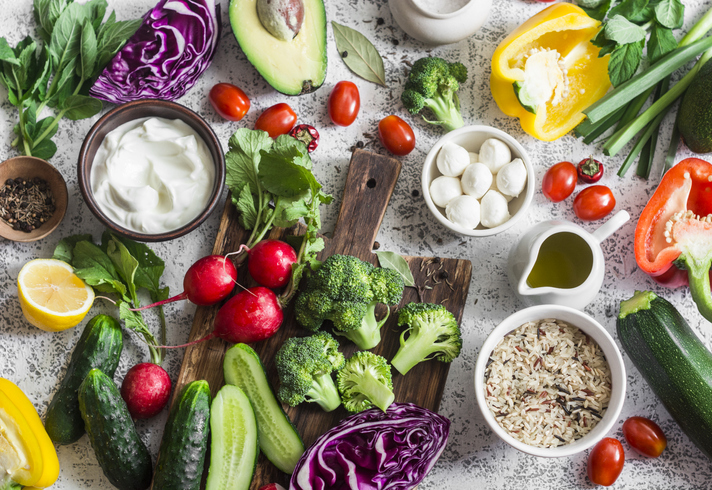
- To meet the Canada’s Food Guide recommendation of half your plate vegetables and fruit, then half your grocery cart should be filled with produce—whether fresh, frozen or canned. Check the freezer section for specials on plain frozen vegetables and fruit—you pay extra for sauces and flavourings and they usually contribute less healthy nutrients like sodium and sugar. When purchasing fresh produce, try to ensure some items are less perishable (e.g. cabbage, root vegetables, collard greens, citrus fruit, apples, pears, avocados). You can save these for later in the week and use up more perishable items first (e.g. berries, melons, lettuce, mushrooms). Buying fresh, local and in season can also help save money.
- One of the best places to save on groceries is with whole grains. Choose those with only one ingredient for the best price, like bulk packaged oats, brown rice, barley, millet, pasta and whole grain flour. Generally, these cost less than half of their flavoured counterparts like boxed breakfast cereal, instant oat packets, or rice or pasta in sauce.
- Protein foods tend to be where we spend most of our grocery dollars but we can find savings here too. Canada’s Food Guide recommends choosing plant-based proteins more often and there is nothing more affordable than dried (or canned) legumes and pulses and tofu. These should make up one of your meals most days of the week for optimal budgeting and health. Choose more affordable nuts and seeds, like peanuts and sunflower, ideally no or low sodium versions. Stock up on canned salmon, tuna and sardines, especially when on sale. When buying chicken, purchase the whole bird rather than cuts for the best deal. After roasting or grilling it, save the bones to make stock. Limit red meat purchases to more affordable cuts and only buy enough for 1 meal for the week. Avoid preserved and deli meats which may contain high levels of sodium and often go bad quickly once opened.
- Limit your time in the center aisles of the store, where most of the highly processed foods are found. Consider buying just one treat per family member or rotate who chooses a treat each week.
Finally, do not forget about food banks—either to use one if in need or support them if you are financially able. They are an essential service in our communities that many individuals and families rely on, especially in difficult times like COVID-19. To access one in your area or to donate, visit: https://www.foodbanksbc.com/

Share This Post
- →$post->category Timber\Term(16)
- contents
- Static class properties (1)
- Available methods (30)
- public id -> integer27
- public ID -> integer27
- public object_type -> string(4) "term"
- public PostClass -> string(11) "Timber\Post"
- public TermClass -> string(4) "Term"
- public _children -> NULL
- public name -> string(28) "Healthy Eating & Cooking"
- public taxonomy -> string(8) "category"
- public term_id -> integer27
- public slug -> string(26) "healthy-eating-and-cooking"
- public term_group -> integer0
- public term_taxonomy_id -> integer27
- public parent -> integer0
- public count -> integer17
- public filter -> string(3) "raw"
- public term_order -> string(1) "0"
- public $representation :: string(4) "term"
- →public static from($tid, $taxonomy) -> static
@param $tid @param $taxonomy @return static Defined in <ROOT>wp-content/plugins/timber-library/lib/Term.php:91
- →public __call($field, $args) -> mixed
This is helpful for twig to return properties and methods see: https://github.com/fabpot/Twig/issues/2 @return mixed Inherited from Timber\Core Defined in <ROOT>wp-content/plugins/timber-library/lib/Core.php:26
- →public __construct($tid = NULL, $tax = "")
@param int $tid @param string $tax Defined in <ROOT>wp-content/plugins/timber-library/lib/Term.php:68
- →public __get($field) -> mixed
This is helpful for twig to return properties and methods see: https://github.com/fabpot/Twig/issues/2 @return mixed Inherited from Timber\Core Defined in <ROOT>wp-content/plugins/timber-library/lib/Core.php:35
- →public __isset($field) -> boolean
@return boolean Inherited from Timber\Core Defined in <ROOT>wp-content/plugins/timber-library/lib/Core.php:15
- →public __toString() -> string
@return string Defined in <ROOT>wp-content/plugins/timber-library/lib/Term.php:81
- →public can_edit() -> bool
Can you edit this post/term/user? Well good for you. You're no better than me. @example ```twig {% if post.can_edit %} <a href="{{ post.edit_link }}">Edit</a> {% endif %} ``` ```html <a href="http://example.org/wp-admin/edit.php?p=242">Edit</a> ``` @return bool Inherited from Timber\Core Defined in <ROOT>wp-content/plugins/timber-library/lib/Core.php:100
- →public children()
@api @return array Defined in <ROOT>wp-content/plugins/timber-library/lib/Term.php:361
- →public description()
@api @return string Defined in <ROOT>wp-content/plugins/timber-library/lib/Term.php:369
- →public edit_link()
@api @return string Defined in <ROOT>wp-content/plugins/timber-library/lib/Term.php:383
- →public get_children()
@internal @return array Defined in <ROOT>wp-content/plugins/timber-library/lib/Term.php:331
- →public get_edit_url()
@internal @return string Defined in <ROOT>wp-content/plugins/timber-library/lib/Term.php:229
- →public get_field($field_name) -> mixed
@param string $field_name @return mixed Inherited from Timber\Core Defined in <ROOT>wp-content/plugins/timber-library/lib/Core.php:125
- →public get_link() -> string
@internal @deprecated since 1.0 @return string Defined in <ROOT>wp-content/plugins/timber-library/lib/Term.php:265
- →public get_meta_field($field_name) -> string
@internal @param string $field_name @return string Defined in <ROOT>wp-content/plugins/timber-library/lib/Term.php:238
- →public get_method_values() -> array
@return array Inherited from Timber\Core Defined in <ROOT>wp-content/plugins/timber-library/lib/Core.php:115
- →public get_path() -> string
@internal @deprecated since 1.0 @return string Defined in <ROOT>wp-content/plugins/timber-library/lib/Term.php:256
- →public get_posts($numberposts_or_args = 10, $post_type_or_class = any, $post_class = "") -> array|bool|null
Get posts that have the current term assigned. @internal @param int|array $numberposts_or_args Optional. Either the number of posts or an array of arguments for the post query that this method is going. to perform. Default `10`. @param string $post_type_or_class Optional. Either the post type to get or the name of post class to use for the returned posts. Default `any`. @param string $post_class Optional. The name of the post class to use for the returned posts. Default `Timber\Post`. @return array|bool|null Defined in <ROOT>wp-content/plugins/timber-library/lib/Term.php:283
- →public import($info, $force = false)
Takes an array or object and adds the properties to the parent object @example ```php $data = array('airplane' => '757-200', 'flight' => '5316'); $post = new Timber\Post() $post->import(data); echo $post->airplane; //757-200 ``` @param array|object $info an object or array you want to grab data from to attach to the Timber object Inherited from Timber\Core Defined in <ROOT>wp-content/plugins/timber-library/lib/Core.php:59
- →public link() -> string
Returns a full link to the term archive page like `http://example.com/category/news` @api @example ```twig See all posts in: <a href="{{ term.link }}">{{ term.name }}</a> ``` @return string Defined in <ROOT>wp-content/plugins/timber-library/lib/Term.php:398
- →public meta($field_name) -> string
Retrieves and outputs meta information stored with a term. This will use both data stored under (old) ACF hacks and new (WP 4.6+) where term meta has its own table. If retrieving a special ACF field (repeater, etc.) you can use the output immediately in Twig — no further processing is required. @api @param string $field_name @example ```twig <div class="location-info"> <h2>{{ term.name }}</h2> <p>{{ term.meta('address') }}</p> </div> ``` @return string Defined in <ROOT>wp-content/plugins/timber-library/lib/Term.php:421
- →public path() -> string
Returns a relative link (path) to the term archive page like `/category/news` @api @example ```twig See all posts in: <a href="{{ term.path }}">{{ term.name }}</a> ``` @return string Defined in <ROOT>wp-content/plugins/timber-library/lib/Term.php:435
- →public posts($numberposts_or_args = 10, $post_type_or_class = any, $post_class = "") -> array|bool|null
Gets posts that have the current term assigned. @api @example ```twig <h4>Recent posts in {{ term.name }}</h4> <ul> {% for post in term.posts(3, 'post') %} <li> <a href="{{ post.link }}">{{ post.title }}</a> </li> {% endfor %} </ul> ``` If you need more control over the query that is going to be performed, you can pass your custom query arguments in the first parameter. ```twig <h4>Our branches in {{ region.name }}</h4> <ul> {% for branch in region.posts({ posts_per_page: -1, orderby: 'menu_order' }, 'branch', 'Branch') %} <li> <a href="{{ branch.link }}">{{ branch.title }}</a> </li> {% endfor %} </ul> ``` @param int|array $numberposts_or_args Optional. Either the number of posts or an array of arguments for the post query that this method is going. to perform. Default `10`. @param string $post_type_or_class Optional. Either the post type to get or the name of post class to use for the returned posts. Default `any`. @param string $post_class Optional. The name of the post class to use for the returned posts. Default `Timber\Post`. @return array|bool|null Defined in <ROOT>wp-content/plugins/timber-library/lib/Term.php:487
- →public title()
@api @return string Defined in <ROOT>wp-content/plugins/timber-library/lib/Term.php:495
- →public update($key, $value)
@param string $key @param mixed $value Defined in <ROOT>wp-content/plugins/timber-library/lib/Term.php:348
- →protected static get_tid($tid) -> int|array
@internal @param int $tid @return int|array Defined in <ROOT>wp-content/plugins/timber-library/lib/Term.php:199
- →protected get_term($tid) -> mixed
@internal @param int|object|array $tid @return mixed Defined in <ROOT>wp-content/plugins/timber-library/lib/Term.php:161
- →protected get_term_from_query()
@internal @return integer Defined in <ROOT>wp-content/plugins/timber-library/lib/Term.php:108
- →protected get_term_meta($tid) -> array
@internal @param int $tid @return array Defined in <ROOT>wp-content/plugins/timber-library/lib/Term.php:150
- →protected init($tid)
@internal @param int $tid Defined in <ROOT>wp-content/plugins/timber-library/lib/Term.php:125